Browsing "Older Posts"

Interactive Grid: Validation - Check for duplicated column entries over all rows

Von Tobias Arnhold → 4.01.2020
I had this situation now a few times and was always to lazy to write it down. :/

During my last task within the fabe project I hat to create a validation to check for duplicated entries inside an Interactive Grid.
Whenever I add "None of the above" twice, an error should occur:
This blog post from Lino Schilde was a good start for my final solution:

Interactive Grid Validation
Validation of Type: PL/SQL Function (returning Error Text)
Code:
declare
  v_cnt number;
begin
 
-- check only if insert or update (not delete "D")
if :APEX$ROW_STATUS in ('C','U') then

  -- select only if the current row is set to Y
  -- positive result if one answer was set to Y
  select max(case when none_yn = 'Y' then 1 else 0 end)
  into v_cnt
  from answer
  where question_id = :P301_QUESTION_ID
  and answer_id != nvl(:ANSWER_ID,0)
  and :NONE_YN = 'Y';
 
  if v_cnt = 1 then
    return 'Another answer was already set up with "None of the above". You need to change and save it first.';
  end if;

end if;
end;

My solution used a "max" aggregation within a "case when" trick to get the right result.

Maxime Tremblay gave me a really important tip:
If I add more then one row through the IG and press save. The validation is not gone be triggered.

To fix that you to add a unique index:
create unique index ANSWER_UK1 on ANSWER (
  case when NONE_YN = 'Y' then QUESTION_ID end
);


--
--

Tip of the day
All those meeting clients (Skype, Zoom, Hangouts ...) can also be used for APEX friends and beer meetups. #beer #orclapex

Interactive Grid: After Update Trigger

Von Tobias Arnhold → 3.29.2020
If you want to run a process after the "Interactive Grid" successfully updated all rows you can achieve this with a dynamic action. This can be necessary if you need to update certain columns calculated over several row in the same table you updated within the grid. Problem is to refresh the related data inside the grid as well.

Example:
You edit 3 rows for column A within your grid.
The grid updates column A row by row.
After that an update process should calculate a new result for column B which includes the data from all those updated 3 rows in column A.

Column A
row 1: 150 
row 2: 200
row 3: 100

Column B includes the sum of  column A
row 1: 450 
row 2: 450 
row 3: 450  

All you need to do is to define your Grid like this:
Interactive Grid > Advanced > Static ID: igYourGrid

Dynamic Action Event: Save [Interactive Grid]
Selection Type: Region
Region: Your Grid
Event Scope: Static

Action: Execute PL/SQL Code
custom_pkg.after_update_process;

Action: Execute Javascript Code
var model = apex.region("igYourGrid").widget().interactiveGrid("getViews").grid.model;
model.fetchRecords(model._data);


Be aware that the custom_pkg.after_update_process; process may not be executed when JavaScript errors occur.

This solution is completely dynamic and does not require a page submit.

--
--

Tip of the day
Since all conferences get cancelled worldwide join those online conferences instead:
ACE's at Home: https://itoug.it/aces-at-home/ (March 31th '20)
APEX@Home: https://asktom.oracle.com/pls/apex/f?p=100:551:::NO:551:P551_CLASS_ID:744 (April 16th '20)

Die inoffizielle APEX Connect Agenda

Von Tobias Arnhold → 4.01.2019
Noch etwas mehr als einen Monat bis zur APEX Connect 2019 und so langsam steigt bei allen die Vorfreude. Dieses Jahr wird es neben dem voll gepackten offiziellen Programmplan auch die ein oder andere Community Aktivität zu erleben geben.

Aber eins nach dem Anderen. Zunächst mal der Verweis auf das aktuelle Vortragsprogramm:


Am Dienstag den 07.05. ist um 9.00 Uhr der offizielle Startschuss und am 09.05. um 17:00 Uhr beenden wir die Connect mit einer Keynote von Jonathan Lewis.

Davor und dazwischen gibt es aber neben dem offiziellen Programm noch allerhand MEHR zu erleben.

Montag 17-21 Uhr: Meetup in der Uni Bonn (kostenlos)
Montag ab 21 Uhr: Gemeinsames Abendessen + 🍺; Ort - offen - (Selbstzahler)

Dienstag 18-20 Uhr: individuelles Abendbrot in der Nähe des Hotels
Dienstag ab 20:30 Uhr: Offene Fragerunde mit dem Oracle Development Team und das Beste aus den letzten Monaten.
Dienstag ab 22 Uhr: Ausklingen an der Bar (Selbstzahler)

Mittwoch 7:30 Uhr: 5k Fun Run
Mittwoch 18:00 Uhr: Dinner Cruise
Mittwoch ab 22 Uhr: Party Open End im Club "N8schicht" (Selbstzahler)


Damit ihr alles Wichtige auch während der Konferenz mit bekommt, meldet euch an Twitter an und folgt diesen beiden Hashtags:
#orclapex #apexconn19
 

And the APEX Coin goes to...

Von Tobias Arnhold → 3.05.2019
And the APEX Coin goes to...


Before I tell you.. Here is the story behind it!

Adrian Png is a Senior APEX developer and he is doing a lot of things for the APEX Community. For that reason he earned the APEX.WORLD Member of the year award.

His last outstanding idea was the APEX Challenge Coin!
In short: You can announce one or more great APEX developers who you think earn an APEX Coin.
But please read the full story here: Announcing the APEX Challenge Coin 


Of course I had to ask Adrian to send me 2 coins.


Unfortunately I know to many great APEX developers only in Germany. How in hell will I ever be able to choose one???

So my choice fell on 2 passionate people doing not only APEX. They lead and support our German APEX Community since years. Here are some examples:
 - APEX Meetup organizers
 - Member of the DOAG development community
 - Supporting the APEX Connect conference

But this is not the main reason!

The main reason is the passionate work in supporting and helping "Woman in Tech" (WIT) to become part of our wonderful APEX community.


And the APEX Coin goes to... Carolin Hagemann and Sabine Heimsath !


P.S.: As you can see on the picture I got 3 coins. So thanks Adrian for giving me one as well. :)

Der Fahrplan bis zur APEX Connect 2019

Von Tobias Arnhold → 2.22.2019
Im Mai 2017 hatte ich euch gefragt worauf ihr euch am meisten freut was die damals anstehende APEX Connect betraf.
Nun schreiben wir das Jahr 2019 und bis zur Connect stehen noch einige Events vor der Tür, bei denen es neben dem technischen Wissensaustausch vor allem auch um die Vernetzung und das teilen des gemeinsamen Spirits geht.

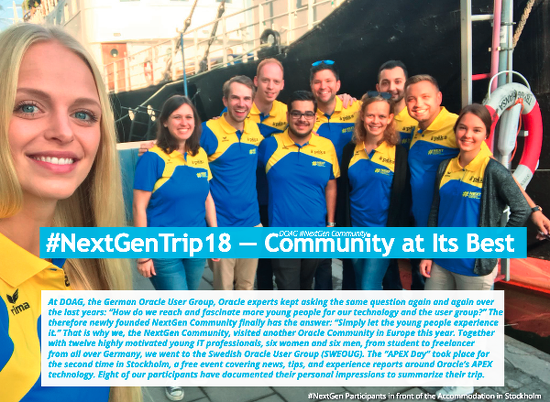
Und falls Ihr euch fragt weshalb ich immer und immer wieder von "Spirit" rede, dann schaut euch mal den Artikel "#NextGenTrip18 — Community at Its Best" im ORAWORLD Magazin auf Seite 39 an. Dieser repräsentiert das Wort "Spirit" ganz gut. :)


Hier nun der Fahrplan bis zur APEX Connect 2019

Meetups
Das nächste Meetup findet am 11.03. in München zum Thema "APEX 19.1 New Features" statt.
Die anderen Meetupgruppen befinden sich noch im Winterschlaf. News gibt es aus Dresden, dort wurde eine neue Meetup Gruppe gegründet. Das erste Treffen ist bereits in Planung.
Eine Übersicht aller Meetups findet ihr auf apex.world.
Eure Stadt fehlt? Ihr wollt aber trotzdem eine Gruppe gründen und wisst nicht wie? Schreibt mich einfach an (Twitter, Mail) und ich versuche euch dabei zu unterstützen.


Workshops
Am 18.03. findet ein kostenloser APEX Workshop in Trier statt inklusive Hands On. Beeilt euch die Plätze sind begrenzt.

In Frankfurt gibt es am 13.03 einen kostenlosen Oracle Datenbank-Technologie Tag.

Zwischen dem 09.-10.04 bietet die MT AG einen APEX Migrations-Workshop an. Geeignet für alle die endlich auf APEX 18.2 migrieren möchten.


APEX Competition
Bis zur Connect läuft parallel auch die APEX Competition 2019 bei der es darum geht ein APEX Plugin zu entwickeln. Der Gewinner erhält 850 €.
Die Competition läuft noch bis zum 07. April. Genug Zeit für eurer erstes Plugin, den passenden Einstieg findet ihr übrigens in diesem aufgezeichneten Webinar:
Entwicklung von Plug-ins für Oracle Apex – Kurzer Einstieg


Im Mai findet dann die heiligste aller APEX Veranstaltungen im deutschsprachigen Raum statt:

Die APEX Connect

Am Vortag der Connect dem 06.05. (Montag) wird es ein kostenloses Meetup geben, bei dem bekannte Oracle Core Entwickler die letzten News rund um APEX, PL/SQL und Javascript teilen werden.
Zwischen dem 07.05. und dem 09.05. dreht sich dann alles nur noch um die bekannten 4 Buchstaben 

A..P..E..X..

Neben APEX steht natürlich auch wieder SQL, PL/SQL, Datenmodellierung und Javascript im Fokus der Besucher. Highlights rund um das Event werden in den kommenden Wochen über unterschiedliche Blogposts detaillierter kommuniziert, bis dahin schaut euch doch mal die Vortragshighlights und den Bewertungsprozess näher an. Das komplette Programm findet ihr hier:

Mein Highlight dieses Jahr sind definitiv die Beginner Sessions.
Geeignet für Newcomer, Studenten, ehemalige Forms-Entwickler, DBA's und alle die APEX näher kennenlernen möchten.

Modal Dialogs Part 1 - Intro

Von Tobias Arnhold → 1.30.2019
In this 5 part series of blog posts I will share my understanding of how you can open modal dialogs with dynamic values.

First of all: Why would you need that?
There are particular business cases where your modal dialog (page 2) uses data from the parent page (page 1) which was created during runtime.
For example: Map Selector
I want to select a certain position from a map. The map is called by a button and displayed via a modal dialog. The parameter for the default position are defined on the parent page. After I have chosen a particular position on the map the Latitude and Longitude parameter should be transmitted back towards the parent page.


In this introduction I will explain how you can do it with "Standard APEX" functionality.
On my main page 10 I have several search items (like City, Street...) , two return items (Lat, Lon) and a button called SEARCH. The button executes a standard "Submit Page".
In the processing area I add a branch "After Submit" which gets executed by the SEARCH button. The branch process will open page 11 and will transmit all search parameters.
Info: This way opening a modal dialog may not work below APEX 18.1


Now the modal dialog will open. On page load a dynamic action gets executed to create the map:

vAddress =
  apex.item('P11_CITY').getValue() + ' ' +
  apex.item('P11_POSTAL_CODE').getValue() + ' ' +
  apex.item('P11_STREET').getValue() + ' ' +
  apex.item('P11_HOUSE_NUMBER').getValue()

vDiameter = apex.item("P11_DIAMETER" ).getValue();

apex.event.trigger(document, 'showOpenLayersMap', [{address: vAddress, diameter:vDiameter}]);void(0);


In that little code snippet above I create a single string "address" and a diameter parameter to pass into the map function. Which is by the way created on page 0 as a custom dynamic action named "showOpenLayersMap".

My showOpenLayersMap function is doing all the magic. In the moment the end user is doing a double click on a certain position inside the map a trigger executes a custom dynamic action on page 11 named "setLatLon".

...
apex.event.trigger(
  document, 
  'setLatLon', 
  [{latitude:coordinatesItems[1], longitude:coordinatesItems[0]}]
);
...


This one fires 3 TRUE actions to return the Latitude and Longitude parameter to page 10:
1. Execute JavaScript Code
apex.item("P11_LON" ).setValue(this.data.longitude);
apex.item("P11_LAT" ).setValue(this.data.latitude);

2. Execute PL/SQL Code
:P10_LON := :P11_LON;
:P10_LAT := :P11_LAT;

3. Execute JavaScript Code
parent.location.reload();

Unfortunately I couldn't find a way to send the items back to the parent page dynamically. I just couldn't react on the "Dialog Closed" event. I think it has to do with the explicit submit. The dynamic action handler has no idea about the modal dialog.


Ps.: A separate blog post about open layers and open street map will come later...

Result

Interactive Grid - Column stretching

Von Tobias Arnhold → 12.19.2018
Since APEX 18.1 you can define the stretch behavior per column.

You can choose between 3 different options:

Use Report Setting
The column will use the Stretch Report Setting set by the End User to define if the column should stretch or not.
In APEX 18.1 you have a new option to let the end user decide if the columns should be stretched or not.
This option effects all columns by default.

Never
The column will not stretch and always just use the width specified. This is useful for columns with short content like Yes/No or Numbers.
This option will over rule "Use Report Setting" and is really good for link columns or as the documentation says: short content columns.

Always
The column will always stretch, irrespective of the Stretch Report Setting set by the End User.


Results can look slightly different:


Imho: Small enhancement with huge impact.