Browsing "Older Posts"

Browsing Category "SQL"

Dynamic LOV with Pipeline function

Von Tobias Arnhold → 1.18.2018
A new year brought me some new tasks. I had to take over a generic Excel import and the customer wanted some extension by checking if the join on the master tables were successful.

Unfortunate we were talking about a generic solution which meant that all the configuration was saved inside tables including the LOV-tables which were saved as simple select statements.

Goal:
Show all import rows/values which were not fitting towards the master data.

How did I fix it?


Source of LOV data:

Source of import data:
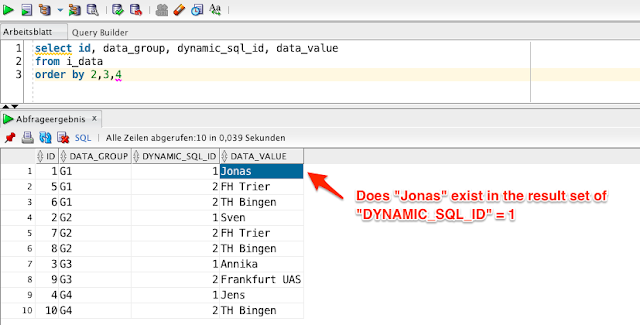

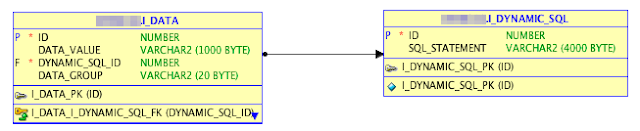
I made a little abstract data model so that you understand what I mean:
I have two tables "I_DATA" including the values from the import and "I_DYNAMIC_SQL" including the LOV statements.
-- ddl
  CREATE TABLE "I_DYNAMIC_SQL" 
   ( "ID" NUMBER NOT NULL ENABLE, 
 "SQL_STATEMENT" VARCHAR2(4000), 
  CONSTRAINT "I_DYNAMIC_SQL_PK" PRIMARY KEY ("ID")
  USING INDEX  ENABLE
   ) ;

  CREATE TABLE "I_DATA" 
   ( "ID" NUMBER NOT NULL ENABLE, 
 "DATA_VALUE" VARCHAR2(1000), 
 "DYNAMIC_SQL_ID" NUMBER, 
 "DATA_GROUP" VARCHAR2(20), 
  CONSTRAINT "I_DATA_PK" PRIMARY KEY ("ID")
  USING INDEX  ENABLE
   ) ;

-- data
REM INSERTING into I_DATA
SET DEFINE OFF;
Insert into I_DATA (ID,DATA_VALUE,DYNAMIC_SQL_ID,DATA_GROUP) values (1,'Jonas',1,'G1');
Insert into I_DATA (ID,DATA_VALUE,DYNAMIC_SQL_ID,DATA_GROUP) values (2,'Sven',1,'G2');
Insert into I_DATA (ID,DATA_VALUE,DYNAMIC_SQL_ID,DATA_GROUP) values (3,'Annika',1,'G3');
Insert into I_DATA (ID,DATA_VALUE,DYNAMIC_SQL_ID,DATA_GROUP) values (4,'Jens',1,'G4');
Insert into I_DATA (ID,DATA_VALUE,DYNAMIC_SQL_ID,DATA_GROUP) values (5,'FH Trier',2,'G1');
Insert into I_DATA (ID,DATA_VALUE,DYNAMIC_SQL_ID,DATA_GROUP) values (6,'TH Bingen',2,'G1');
Insert into I_DATA (ID,DATA_VALUE,DYNAMIC_SQL_ID,DATA_GROUP) values (7,'FH Trier',2,'G2');
Insert into I_DATA (ID,DATA_VALUE,DYNAMIC_SQL_ID,DATA_GROUP) values (8,'TH Bingen',2,'G2');
Insert into I_DATA (ID,DATA_VALUE,DYNAMIC_SQL_ID,DATA_GROUP) values (9,'Frankfurt UAS',2,'G3');
Insert into I_DATA (ID,DATA_VALUE,DYNAMIC_SQL_ID,DATA_GROUP) values (10,'TH Bingen',2,'G4');

REM INSERTING into I_DYNAMIC_SQL
SET DEFINE OFF;
Insert into I_DYNAMIC_SQL (ID,SQL_STATEMENT) values (1,'select d,r from (
   select ''Jonas'' as d, 1 as r from dual union all 
   select ''Sven'' as d, 2 as r from dual union all 
   select ''Jens'' as d, 3 as r from dual union all 
   select ''Annika'' as d, 4 as r from dual
)');
Insert into I_DYNAMIC_SQL (ID,SQL_STATEMENT) values (2,'select d, r
from (
   select ''FH Trier'' as d, 1 as r from dual
   union all
   select ''TH Bingen'' as d, 2 as r from dual
)');

It actually took some time to find a solution fitting my needs.
1. Fast
2. Easy to understand
3. Not tons of code

What I needed was some kind of EXECUTE IMMEDIATE returning table rows instead of single values. With pipeline functions I was able to do it:
create or replace package i_dynamic_sql_pkg as

  /* LOV type */
  type rt_dynamic_lov is record ( display_value varchar2(4000), return_value number );

  type type_dynamic_lov is table of rt_dynamic_lov;

  function get_dynamic_lov (
    p_lov_id number
  ) return type_dynamic_lov pipelined;
end;

create or replace package body i_dynamic_sql_pkg as
  /* global variable */
  gv_custom_err_message varchar2(4000);

  /* Function to return dynamic lov as table */
  function get_dynamic_lov (
    p_lov_id number
  ) return type_dynamic_lov pipelined is

    row_data rt_dynamic_lov;

    type cur_lov is ref cursor;
    c_lov cur_lov;

    e_statement_exist exception;

    v_sql varchar2(4000);
  begin

    -- 'Exception check - read select statement';
    select 
       max(sql_statement)
    into
       v_sql
    from i_dynamic_sql
    where id = p_lov_id;

    -- 'Exception check - result';
    if v_sql is null
    then
      gv_custom_err_message := 'Error occured. No list of value found.';
      raise e_statement_exist;
    end if;

    -- 'Loop dynamic SQL statement';
    open c_lov for v_sql;
    loop
       fetch c_lov 
       into 
         row_data.display_value,
         row_data.return_value;
       exit when c_lov%notfound;

       pipe row(row_data);
    end loop;
    close c_lov;

  exception
  when e_statement_exist then
      rollback;
      /*
      apex_error.add_error(
        p_message => gv_custom_err_message
      , p_display_location => apex_error.c_inline_in_notification
      );
      */
      raise_application_error(-20001, gv_custom_err_message); 
  when others then
      raise;
  end;
end;

Now I just had to create a SQL statement doing the job for me:
-- ddl
select
  da.data_group,
  da.data_value,
  /* check if a return value exist */
  case
    when lov.display_value is not null
    then 'OK'
    else 'ERROR'
  end as chk_lov_data_row,
  /* apply error check for the whole group */
  case
    when min(case
                when lov.display_value is not null
                then 1
                else 0
              end) over (partition by da.data_group)
        = 0
    then 'ERROR'
    else 'OK'
  end as chk_lov_data_group
from i_data da
/* Join on my pipeline function including the dynamic sql id */
left join table(i_dynamic_sql_pkg.get_dynamic_lov(da.dynamic_sql_id)) lov
on (da.data_value = lov.display_value)
order by da.data_group, da.dynamic_sql_id, da.data_value;

Result:

The best Oracle technology week ever - Part 1: Helsinki and Stockholm

Von Tobias Arnhold → 9.07.2017
You remember my last blogpost describing how my #europeTour would be like:
#orclapex Europe tour 

It was a week with as little sleep as possible. Reasons:
 - traveling
 - just was to excited
 - to much party

It all started in Helsinki with the first Oracle APEX day in Finland.
I reached Helsinki with Richard Rieb around 10 o'clock in the evening. It was dark and cold, our taxi driver spoke 5 words to us but good hard rock music was played on the radio. We knew we have come to the right place.
At the next day we met the organizers (Heli and Marko), the other speakers (Carsten Czarski, Shakeeb Rahman, Matthias Nöll and Mathias Magnussen) and 30 other APEX interested people.
I was happily surprised to meet Matt Nolan from the FOEX crew.
Background story: This guy gave me, in hard times maybe 8 years ago, some good tips and kept my APEX passion alive.
I was even more surprised to meet Jari Lainen which created a really nice APEX example application and has an awesome blog as well. He mentioned to join a new APEX project soon. He will hopefully start writing then again.

The presentations were really good but see for yourselves:


Btw: If you think I do crazy stuff then I always find someone even more devoted like Heli who flew to Soul for the Oracle code conference in between the Finnish APEX event and the POUG in Krakow.

We the other presenters, except Mathias who had to fill the time gaps in between the conferences, took the cruiser ship to Stockholm.


Funny fact: beer at the bar was 6 €, one beer at the tax free shop costs 3,50 € and 24 for of them in a pack costs 20 €. You know what we did.

We enjoyed beers in a stormy night at the railing watching the ocean.
Tip: On a shaky boat just drink 5 beers and feels like you have drunken 10.

In Stockholm we got the perfect location including really tasty food during the first Oracle APEX day in Sweden. 60 participants were listening to our presentation. See for yourselves:


We got great feedback by the customers and enjoyed several nice talks. I even talked to a guy from Denmark who just came to participate at this particular conference. Thanks to the Swedish Oracle Usergroup (SWEOUG) making it possible. My special thanks goes to Daniel and Mathias.

We spent the night by my relatives as Richard discoverd that one of the beers got broken and drenched his backpack. :D Luckily he flew home the day after.

Next Morning at 5 o'clock we (Matthias and me) headed towards the Arlanda airport and took the flight to Berlin.
In Berlin we met the students for the "NextGEN goes POUG trip" (#pougtrip)

In case you want to look at all the tweets from the conference then search for #europeTour, #sweougApex17 or #orclapex.

Next time I will tell you all about the trip to the "POUG 2017". :) Look closely at the DOAG website.

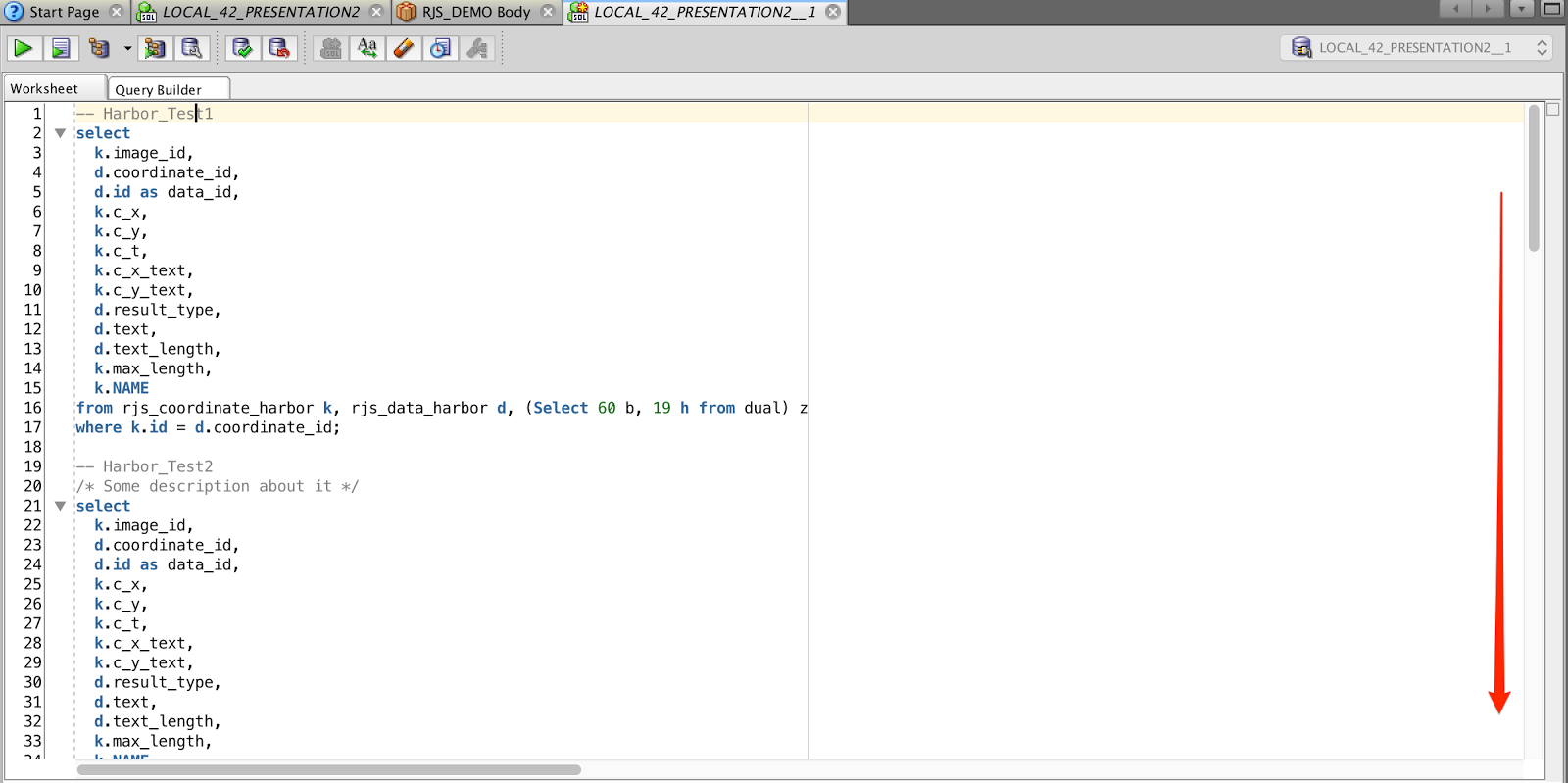
SQL Developer: Quick Outline with SQL statements

Von Tobias Arnhold → 11.30.2016
Most of you probably know the "Quick Outline" function you have inside the SQL Developer.
It helps you to easily jump between different functions/procedures inside a package.


My colleague Holger told me about a bug in SQL Developer 3.x where you could use the "Outline" view with normal SQL files, too. Unfortunately in version 4 it didn't work anymore. So he stayed with version 3 for a long while. Otherwise he would had to scroll again instead of a short jump towards a specific SQL select.


A few days ago he asked me again if I knew a way how to easily jump between SQL statements inside a SQL file.
So I thought I talk to a SQL developer specialist "Sabine Heimsath". She knows all about those little tricks I have no clue about. But Sabine didn't know how to do it either.

My last chance was to ask on Twitter about a proper solution.

Even on Twitter nobody answered me. I guess they just started to implement such a feature. :)

Anyway yesterday Holger told me that he found a way to get it to run on SQL Developer 4.1.
Reason enough for me to share the awesome idea.

create or replace package body "" as 
/* ************************************************************************************************************************************************ */
function "SQL example 1";
/
-- SQL Statement

/* ************************************************************************************************************************************************ */
function "SQL example 2 - no character capping";
/
-- SQL Statement

/* ************************************************************************************************************************************************ */
function SQL_example_3_without_double_quote;
/
-- SQL Statement

end;


Finally a little GIF movie showing you the usage in action:

Tablespaces verkleinern (TEMP, USER_TS, ORA-03297)

Von Tobias Arnhold → 11.28.2016

Info
Die Select-Statements in diesem Blogpost habe ich von anderen Webseiten kopiert. Daher ist dieser Beitrag eher als Zusammenfassung unterschiedlicher Lösungsversuche zu sehen und dient mir als schnelle Hilfe bei der Verkleinerung eines zu großen Tablespaces. Schaut euch die Quellen an, die sehr viel detaillierter auf die jeweiligen Probleme eingehen.

Wer kennt nicht die Situation? Der DBA ruft an und meint der TEMP Tablespace verbraucht mehrere hundert Gigabyte an Speicher.

Was ist in solch einer Situation zu tun?
In dem Moment wo ein TEMP Tablespace überproportional ansteigt, muss eine Session diesen Anstieg verursachen. Mit dem folgenden Select erfahren Sie welche Session wie viel Speicher im TEMP-Tablespace verbraucht.

-- Source: http://stackoverflow.com/questions/174727/discover-what-process-query-is-using-oracle-temp-tablespace
select   b.tablespace
       , b.segfile#
       , b.segblk#
       , round (  (  ( b.blocks * p.value ) / 1024 / 1024 ), 2 ) size_mb
       , a.sid
       , a.serial#
       , a.sql_id
       , a.username
       , a.osuser
       , a.program
       , a.status
    from v$session a
       , v$sort_usage b
       , v$process c
       , v$parameter p
   where p.name = 'db_block_size'
     and a.saddr = b.session_addr
     and a.paddr = c.addr
order by b.tablespace
       , b.segfile#
       , b.segblk#
       , b.blocks;

Über die SQL_ID können Sie wenn vorhanden auch auf das Verursacher-Select zugreifen:
-- Source: http://cheatsheet4oracledba.blogspot.de/2014/01/how-to-find-top-temp-using-oracle.html
select sql_text 
from v$sql 
where sql_id='b6kta08q9jj3f';

Über den SQL Developer > Tools > Monitor Sessions können Sie die betroffene SID killen.

Anschließend wird der Verbrauch des TEMP-Tablespace zwar wieder zurückgefahren, aber die Größe bleibt bestehen.

Prüfen Sie daher zunächst die aktuelle verwendete Größe im TEMP-Tablespace:
-- Source: https://alexzeng.wordpress.com/2012/06/13/how-to-find-the-sql-that-using-lots-of-temp-tablespace-in-oracle/
select b.total_mb,
       b.total_mb - round(a.used_blocks*8/1024) current_free_mb,
       round(used_blocks*8/1024)                current_used_mb,
      round(max_used_blocks*8/1024)             max_used_mb
from v$sort_segment a,
 (select round(sum(bytes)/1024/1024) total_mb from dba_temp_files ) b;

-- Oder:
select * from dba_temp_free_space;

Wenn der Wert (current_used_mb) entsprechend klein ist, dann können Sie den TEMP-Tablespace verkleinern, andernfalls haben Sie nicht die richtige Session gekillt.

TEMP-Tablespace verkleinern:
select file_name,bytes,blocks from dba_temp_files;
-- .../tempfile/temp.911 564863696896 68953088

alter tablespace temp shrink space;

select file_name,bytes,blocks from dba_temp_files;
-- ../tempfile/temp.911 289513472 35341


Es kann aber auch vorkommen das eine normaler Tablespace zu groß wurde und dadurch viel mehr Platz verbraucht als es aktuell verwendet.
Um darüber einen Überblick zu erhalten, führen Sie folgendes Select aus:
 -- Source: Nicht mehr bekannt :(
select
   mb.*
  ,nvl(round(100 * freemb / sizemb,1),0) free_prozent
from 
 (select 
    b.tablespace_name
   ,round(tbs_size,2) as sizemb
   ,a.free_space freemb
  from 
    (select 
       tablespace_name
      ,round(sum(bytes)/1024/1024 ,2) as free_space 
     from dba_free_space group by tablespace_name
    ) a
   ,(select 
      tablespace_name, 
      sum(bytes)/1024/1024 as tbs_size 
     from dba_data_files group by tablespace_name
     union
     select 
       tablespace_name, 
       sum(bytes)/1024/1024 tbs_size
     from dba_temp_files
     group by tablespace_name 
    ) b
  where a.tablespace_name(+)=b.tablespace_name
  ) mb
order by free_prozent;

Bei einer solchen Situation muss anstelle des Tablespaces die Datendatei verkleinert werden.
Nun benötigen Sie dafür noch den richtigen Dateinamen, um die korrekte Datei zu verkleinern:
SELECT 
  name, 
  bytes/1024/1024 AS size_mb
FROM   v$datafile
;

Statement zum verkleinern der Datendatei:
ALTER DATABASE DATAFILE '.../DATAFILE/my_schema.033.123331' RESIZE 3G

Die Verkleinerung kann aber in einem ORA-03297 Fehler enden.

ALTER DATABASE DATAFILE '.../DATAFILE/my_schema.033.123331' RESIZE 3G
Error report -
SQL Error: ORA-03297: file contains used data beyond requested RESIZE value

Jetzt bleiben Ihnen 3 Schritte um mit geringem Aufwand diese Datei doch noch zu verkleinern:

1. Fragmentierung bereinigen
Die Datendatei wurde fragmentiert und eine Tabelle liegt am Ende der Datei und verhindert dadurch die Verkleinerung.

Beispiel:
Die Datendatei ist 90 GB groß und tatsächlich werden nur 2 GB verwendet.
Eine Tabelle liegt von der Verteilung her zwischen 82-83 GB. Heißt, ich könnte die Datendatei nur auf 84G verkleinern. Also müssen Sie in solch einem Fall das Objekt ausfindig machen und löschen. Sinnvollerweise kopiere ich vorher die Tabelle in einen anderen Tablespace, um diese anschließend wieder herstellen zu können. :)

Um die Blockverteilung analysieren zu können, muss vorher die richtige File-ID ausgelesen werden:
select 
  s.tablespace_name, s.owner, s.segment_name, s.segment_type,
  sum(s.bytes) size_in_bytes,
  round(sum(s.bytes) / 1024 / 1024, 2) size_in_m,
  sum(round(sum(s.bytes) / 1024 / 1024, 2)) over() as size_in_m_gesamt,
  f.file_id,
  f.file_name
from sys.dba_segments s, sys.dba_data_files f
where f.tablespace_name = s.tablespace_name
and f.file_id = s.header_file
and s.tablespace_name in ('NTDC03')
group by s.tablespace_name, s.owner, s.segment_name, s.segment_type, f.file_id, f.file_name
order by s.tablespace_name, s.owner, s.segment_name;

Das folgende Select zeigt die Blockverteilung mit den verwendeten DB-Objekten innerhalb der Datendatei:
 Source: http://www.orait.de/db_fehler/ora-03297_file-contains-used-data-beyond.html
select 
  file_id,
  block_id, 
  blocks*8192/1024/1024 as mb,
  owner||'.'||segment_name as object_name,
  block_id*8192/1024/1024 as position_mb
from sys.dba_extents
where file_id = 206
union
select 
  file_id, 
  block_id, 
  blocks*8192/1024/1024 as mb, 
  'Free' as object_name,
  block_id*8192/1024/1024 as position_mb
from sys.dba_free_space
where file_id = 206
order by 1,2,3;


Wenn Sie die betroffenen Tabellen gelöscht haben, dann klappt auch die Verkleinerung wieder:  
ALTER DATABASE DATAFILE '.../DATAFILE/my_schema.033.123331' RESIZE 3G 
Database datafile '.../DATAFILE/my_schema.033.123331' altered.

2. Recycle Bin löschen
purge recyclebin;

3. Coalesce Tablespace
alter tablespace fred coalesce;

Info: TEMP Tablespace auf Unlimited setzen
alter database tempfile '.../TEMPFILE/temp.910.901132571' autoextend on next 250m maxsize unlimited;

Using dynamic tooltips in your Interactive Report

Von Tobias Arnhold → 5.31.2016

Inside an Interactive Report (IR) I had a comment column. The comments in this column could become really large and the users wanted the comments to be automatically trimmed if more then 60 characters were displayed. If the user moved the mouse above a trimmed comment then a tooltip should be display including all comment text.

My first idea was to check for existing plugins which could do this job for me. So I searched on apex.world and found the plugin called "APEX Tooltip" developed by Daniel Hochleitner.

The plugin looked great from what I could see in the example application. When I tried it in my application I found out that all comments must be applied manually in the dynamic action.
Not exactly what I needed. :)

Luckily it was really easy to extend the plugin in a way that I could use it in my IR. To achieve what I need I had to update the javascript file: apextooltip.js
// APEX Tooltip functions
// Author: Daniel Hochleitner
// Updated by Tobias Arnhold
// Version: 1.1

// global namespace
var apexTooltip = {
  // parse string to boolean
  parseBoolean: function(pString) {
    var pBoolean;
    if (pString.toLowerCase() == 'true') {
      pBoolean = true;
    }
    if (pString.toLowerCase() == 'false') {
      pBoolean = false;
    }
    if (!(pString.toLowerCase() == 'true') && !(pString.toLowerCase() == 'false')) {
      pBoolean = undefined;
    }
    return pBoolean;
  },
  // function that gets called from plugin
  showTooltip: function() {
    // plugin attributes
    var daThis = this;
    var vElementsArray = daThis.affectedElements;
    var vTheme = daThis.action.attribute01;
    var vContent = daThis.action.attribute02;
    var vContentAsHTML = apexTooltip.parseBoolean(daThis.action.attribute03);
    var vAnimation = daThis.action.attribute04;
    var vPosition = daThis.action.attribute05;
    var vDelay = parseInt(daThis.action.attribute06);
    var vTrigger = daThis.action.attribute07;
    var vMinWidth = parseInt(daThis.action.attribute08);
    var vMaxWidth = parseInt(daThis.action.attribute09);
    var vLogging = apexTooltip.parseBoolean(daThis.action.attribute10);
    // Logging
    if (vLogging) {
      console.log('showTooltip: affectedElements:', vElementsArray);
      console.log('showTooltip: Attribute Theme:', vTheme);
      console.log('showTooltip: Attribute Content:', vContent);
      console.log('showTooltip: Attribute Content as HTML:', vContentAsHTML);
      console.log('showTooltip: Attribute Animation:', vAnimation);
      console.log('showTooltip: Attribute Position:', vPosition);
      console.log('showTooltip: Attribute Delay:', vDelay);
      console.log('showTooltip: Attribute Trigger:', vTrigger);
      console.log('showTooltip: Attribute minWidth:', vMinWidth);
      console.log('showTooltip: Attribute maxWidth:', vMaxWidth);
      console.log('showTooltip: Attribute Logging:', vLogging);
    }
    for (var i = 0; i < vElementsArray.length; i++) {
      var vaffectedElement = daThis.affectedElements.eq(i);
      // call tooltipster plugin
      $(vaffectedElement).tooltipster({
        theme: vTheme,
        content: $(vaffectedElement).find('.rep_complete_comment').html(),
        contentAsHTML: vContentAsHTML,
        animation: vAnimation,
        position: vPosition,
        delay: vDelay,
        touchDevices: false,
        trigger: vTrigger,
        minWidth: vMinWidth,
        maxWidth: vMaxWidth,
        debug: vLogging,
        functionBefore: function(origin, continueTooltip) {
          $(vaffectedElement).trigger('apextooltip-show');
          continueTooltip();
        },
        functionAfter: function(origin) {
          $(vaffectedElement).trigger('apextooltip-hide');
        }
      });
    }
  }
};
Of course I had to update my IR as well.
First I trimmed the comment column and added a new hidden comment column:
SELECT
-- ...
  CASE WHEN LENGTH(COMMENT_COL) > 60 THEN SUBSTR(COMMENT_COL,1,60)||'...' ELSE COMMENT_COL END AS COMMENT_COL,
  COMMENT_COL as COMPLETE_COMMENT_COL,
from my_table
Then I updated the column attributes:
COMMENT_COL as plain text
- Static ID: rep_comment
- HTML Expression:
#COMMENT_COL#<div class="rep_complete_comment">#COMPLETE_COMMENT_COL#</div>


COMPLETE_COMMENT_COL as hidden column


I also had to add a small css snippet in the page attributes > CSS > Inline to hide the complete comment:
.rep_complete_comment {
display: none;
}

And as a last step I had to implement the tooltip plugin after refreshing the IR:
I used an advanced jQuery selector to get only those comments affected which had more then 60 characters.
td[headers='rep_comment']:contains('...')


The result looked like this:


SQL: Texte mit Umlauten und Sonderzeichen normieren

Von Tobias Arnhold → 2.16.2016
Im heutigen Beispiel möchte ich einmal kurz aufzeigen, wie Sie einen Text nach Ihren Bedürfnissen hin normieren können. Ich habe dazu die bekanntesten Länder der Erde in einer WITH Clause zusammengefasst und bilde mir anhand des Namens einen später verwendbaren normierten String.

Der Zielstring muss GROSSGESCHRIEBEN sein und darf keine Umlaute (ÖÜÄöüäß) und Sonderzeichen (, '.()-) beinhalten.

Show all views including a specific string in the source code

Von Tobias Arnhold → 2.02.2016
Seems to be a simple problem and easy to fix. Actually it is not because if you try one of these examples then you will fail:

Oracle Spatial (Teil 3) - Entfernung von Punkten berechnen

Von Tobias Arnhold → 1.27.2016
Im heutigen Blogpost möchte ich kurz anhand eines Beispiels aufzeigen, wie Sie die Entfernung von SDO_GEOMETRY Punkten berechnen können. Hierbei gehe ich auch konkret auf das Problem des Verbindens von zwei Datenmengen anhand einer definierten Entfernung ein.