Browsing "Older Posts"

Browsing Category "SQL Developer"

Configure the SQL Developer on Mac OS X for AWS Cloud access

Von Tobias Arnhold → 9.03.2018
I have struggled a while now to correctly configure my Mac so that I can access an Oracle database in the AWS cloud.

Got a couple of strange connection errors:
I/O-Fehler: General SSLEngine problem
Handshake error

I even created a question in the forum:
https://community.oracle.com/message/14924079#14924079
At the end my friend Rüdiger helped me finding the right solution.

What was my configuration:
 - Max OS X 'El Captain'
 - JDK version: Build 1.8.0_181-b13
 - SQL Developer version:  Version 18.2.0.183
 - AWS cloud connectivity via SSL
 - Oracle database

Step by step:

1. Create the certificate "rds-ca-2015-root.der":
https://docs.aws.amazon.com/AmazonRDS/latest/UserGuide/Appendix.Oracle.Options.SSL.html

2. Get your current JDK version:
java -version 
java version "1.8.0_181"

3. Copy the file CER in your JAVA_HOME/jre/lib/security
Full HOME directory: /Library/Java/JavaVirtualMachines/jdk1.8.0_181.jdk/Contents/Home

4. Open a terminal window and go into that directory:
cd /Library/Java/JavaVirtualMachines/jdk1.8.0_181.jdk/Contents/Home/jre/lib/security

5. Execute keytool
sudo keytool -import -alias rds-root -keystore cacerts -file rds-ca-2015-root.der

6. Start your SQL Developer and create a new connection


Connection type: Advanced
JDBC-URL:
jdbc:oracle:thin:@(DESCRIPTION=(ADDRESS=(PROTOCOL=tcps)(HOST=dbxe.xyz.server-center1.rds.amazonaws.com)(PORT=7575))(CONNECT_DATA=(SERVICE_NAME=DBXE)))

Dynamic LOV with Pipeline function

Von Tobias Arnhold → 1.18.2018
A new year brought me some new tasks. I had to take over a generic Excel import and the customer wanted some extension by checking if the join on the master tables were successful.

Unfortunate we were talking about a generic solution which meant that all the configuration was saved inside tables including the LOV-tables which were saved as simple select statements.

Goal:
Show all import rows/values which were not fitting towards the master data.

How did I fix it?


Source of LOV data:

Source of import data:


I made a little abstract data model so that you understand what I mean:
I have two tables "I_DATA" including the values from the import and "I_DYNAMIC_SQL" including the LOV statements.

-- ddl
  CREATE TABLE "I_DYNAMIC_SQL" 
   ( "ID" NUMBER NOT NULL ENABLE, 
 "SQL_STATEMENT" VARCHAR2(4000), 
  CONSTRAINT "I_DYNAMIC_SQL_PK" PRIMARY KEY ("ID")
  USING INDEX  ENABLE
   ) ;

  CREATE TABLE "I_DATA" 
   ( "ID" NUMBER NOT NULL ENABLE, 
 "DATA_VALUE" VARCHAR2(1000), 
 "DYNAMIC_SQL_ID" NUMBER, 
 "DATA_GROUP" VARCHAR2(20), 
  CONSTRAINT "I_DATA_PK" PRIMARY KEY ("ID")
  USING INDEX  ENABLE
   ) ;

-- data
REM INSERTING into I_DATA
SET DEFINE OFF;
Insert into I_DATA (ID,DATA_VALUE,DYNAMIC_SQL_ID,DATA_GROUP) values (1,'Jonas',1,'G1');
Insert into I_DATA (ID,DATA_VALUE,DYNAMIC_SQL_ID,DATA_GROUP) values (2,'Sven',1,'G2');
Insert into I_DATA (ID,DATA_VALUE,DYNAMIC_SQL_ID,DATA_GROUP) values (3,'Annika',1,'G3');
Insert into I_DATA (ID,DATA_VALUE,DYNAMIC_SQL_ID,DATA_GROUP) values (4,'Jens',1,'G4');
Insert into I_DATA (ID,DATA_VALUE,DYNAMIC_SQL_ID,DATA_GROUP) values (5,'FH Trier',2,'G1');
Insert into I_DATA (ID,DATA_VALUE,DYNAMIC_SQL_ID,DATA_GROUP) values (6,'TH Bingen',2,'G1');
Insert into I_DATA (ID,DATA_VALUE,DYNAMIC_SQL_ID,DATA_GROUP) values (7,'FH Trier',2,'G2');
Insert into I_DATA (ID,DATA_VALUE,DYNAMIC_SQL_ID,DATA_GROUP) values (8,'TH Bingen',2,'G2');
Insert into I_DATA (ID,DATA_VALUE,DYNAMIC_SQL_ID,DATA_GROUP) values (9,'Frankfurt UAS',2,'G3');
Insert into I_DATA (ID,DATA_VALUE,DYNAMIC_SQL_ID,DATA_GROUP) values (10,'TH Bingen',2,'G4');

REM INSERTING into I_DYNAMIC_SQL
SET DEFINE OFF;
Insert into I_DYNAMIC_SQL (ID,SQL_STATEMENT) values (1,'select d,r from (
   select ''Jonas'' as d, 1 as r from dual union all 
   select ''Sven'' as d, 2 as r from dual union all 
   select ''Jens'' as d, 3 as r from dual union all 
   select ''Annika'' as d, 4 as r from dual
)');
Insert into I_DYNAMIC_SQL (ID,SQL_STATEMENT) values (2,'select d, r
from (
   select ''FH Trier'' as d, 1 as r from dual
   union all
   select ''TH Bingen'' as d, 2 as r from dual
)');

It actually took some time to find a solution fitting my needs.
1. Fast
2. Easy to understand
3. Not tons of code

What I needed was some kind of EXECUTE IMMEDIATE returning table rows instead of single values. With pipeline functions I was able to do it:
create or replace package i_dynamic_sql_pkg as

  /* LOV type */
  type rt_dynamic_lov is record ( display_value varchar2(4000), return_value number );

  type type_dynamic_lov is table of rt_dynamic_lov;

  function get_dynamic_lov (
    p_lov_id number
  ) return type_dynamic_lov pipelined;
end;

create or replace package body i_dynamic_sql_pkg as
  /* global variable */
  gv_custom_err_message varchar2(4000);

  /* Function to return dynamic lov as table */
  function get_dynamic_lov (
    p_lov_id number
  ) return type_dynamic_lov pipelined is

    row_data rt_dynamic_lov;

    type cur_lov is ref cursor;
    c_lov cur_lov;

    e_statement_exist exception;

    v_sql varchar2(4000);
  begin

    -- 'Exception check - read select statement';
    select 
       max(sql_statement)
    into
       v_sql
    from i_dynamic_sql
    where id = p_lov_id;

    -- 'Exception check - result';
    if v_sql is null
    then
      gv_custom_err_message := 'Error occured. No list of value found.';
      raise e_statement_exist;
    end if;

    -- 'Loop dynamic SQL statement';
    open c_lov for v_sql;
    loop
       fetch c_lov 
       into 
         row_data.display_value,
         row_data.return_value;
       exit when c_lov%notfound;

       pipe row(row_data);
    end loop;
    close c_lov;

  exception
  when e_statement_exist then
      rollback;
      /*
      apex_error.add_error(
        p_message => gv_custom_err_message
      , p_display_location => apex_error.c_inline_in_notification
      );
      */
      raise_application_error(-20001, gv_custom_err_message); 
  when others then
      raise;
  end;
end;

Now I just had to create a SQL statement doing the job for me:
-- ddl
select
  da.data_group,
  da.data_value,
  /* check if a return value exist */
  case
    when lov.display_value is not null
    then 'OK'
    else 'ERROR'
  end as chk_lov_data_row,
  /* apply error check for the whole group */
  case
    when min(case
                when lov.display_value is not null
                then 1
                else 0
              end) over (partition by da.data_group)
        = 0
    then 'ERROR'
    else 'OK'
  end as chk_lov_data_group
from i_data da
/* Join on my pipeline function including the dynamic sql id */
left join table(i_dynamic_sql_pkg.get_dynamic_lov(da.dynamic_sql_id)) lov
on (da.data_value = lov.display_value)
order by da.data_group, da.dynamic_sql_id, da.data_value;

Result:

After the party is before the party

Von Tobias Arnhold → 10.20.2017
Now two months after the #pougtrip everything went back to normal. Except the planning for the next events.

The DOAG #NextGEN is currently starting a "roadshow" at German universities.

Start is the 07.11.2017 at the Trier University of Applied Sciences. We will have 3 presentations covering different technologies: SQL, JS, JSON, SVG, PL/SQL, REST and APEX.
But see for yourself: Oracle Vorträge an der Hochschule Trier


As you can see the agenda is made with APEX :). Inspired by the #pougtrip we plan free beer for all students!

This is our first test run to find out what it takes to get as much students as possible to listen to Oracle related technologies.

From my perspective the question is: What can an Oracle expert contribute to young professionals?

For example: handling real life problems and sharing the experience while using modern technologies. But I think most important is devotion.
You get inspired by an expert mostly depending on how dedicated this person is delivering the information. This event gives us the chance to inspire young professionals to see Oracle in a new light. See the possibilities and feel the devotion by the people who are working with the technology.

BTW: This event wouldn't be possible without two dedicated students. Thanks Rebecca and Abby!

SQL Developer: Quick Outline with SQL statements

Von Tobias Arnhold → 11.30.2016
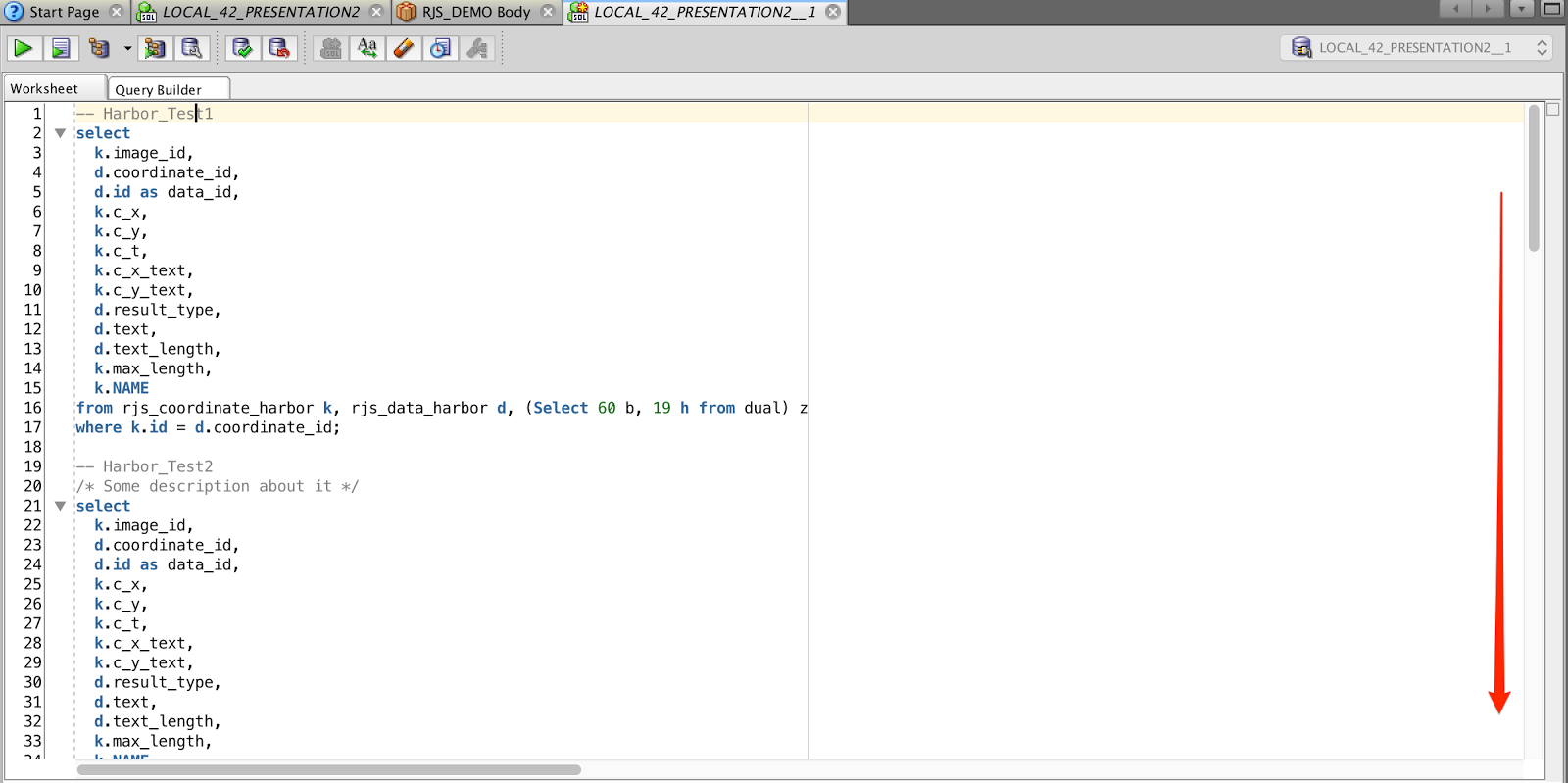
Most of you probably know the "Quick Outline" function you have inside the SQL Developer.
It helps you to easily jump between different functions/procedures inside a package.


My colleague Holger told me about a bug in SQL Developer 3.x where you could use the "Outline" view with normal SQL files, too. Unfortunately in version 4 it didn't work anymore. So he stayed with version 3 for a long while. Otherwise he would had to scroll again instead of a short jump towards a specific SQL select.


A few days ago he asked me again if I knew a way how to easily jump between SQL statements inside a SQL file.
So I thought I talk to a SQL developer specialist "Sabine Heimsath". She knows all about those little tricks I have no clue about. But Sabine didn't know how to do it either.

My last chance was to ask on Twitter about a proper solution.

Even on Twitter nobody answered me. I guess they just started to implement such a feature. :)

Anyway yesterday Holger told me that he found a way to get it to run on SQL Developer 4.1.
Reason enough for me to share the awesome idea.

create or replace package body "" as 
/* ************************************************************************************************************************************************ */
function "SQL example 1";
/
-- SQL Statement

/* ************************************************************************************************************************************************ */
function "SQL example 2 - no character capping";
/
-- SQL Statement

/* ************************************************************************************************************************************************ */
function SQL_example_3_without_double_quote;
/
-- SQL Statement

end;


Finally a little GIF movie showing you the usage in action:

Tablespaces verkleinern (TEMP, USER_TS, ORA-03297)

Von Tobias Arnhold → 11.28.2016

Info
Die Select-Statements in diesem Blogpost habe ich von anderen Webseiten kopiert. Daher ist dieser Beitrag eher als Zusammenfassung unterschiedlicher Lösungsversuche zu sehen und dient mir als schnelle Hilfe bei der Verkleinerung eines zu großen Tablespaces. Schaut euch die Quellen an, die sehr viel detaillierter auf die jeweiligen Probleme eingehen.

Wer kennt nicht die Situation? Der DBA ruft an und meint der TEMP Tablespace verbraucht mehrere hundert Gigabyte an Speicher.

Was ist in solch einer Situation zu tun?
In dem Moment wo ein TEMP Tablespace überproportional ansteigt, muss eine Session diesen Anstieg verursachen. Mit dem folgenden Select erfahren Sie welche Session wie viel Speicher im TEMP-Tablespace verbraucht.

-- Source: http://stackoverflow.com/questions/174727/discover-what-process-query-is-using-oracle-temp-tablespace
select   b.tablespace
       , b.segfile#
       , b.segblk#
       , round (  (  ( b.blocks * p.value ) / 1024 / 1024 ), 2 ) size_mb
       , a.sid
       , a.serial#
       , a.sql_id
       , a.username
       , a.osuser
       , a.program
       , a.status
    from v$session a
       , v$sort_usage b
       , v$process c
       , v$parameter p
   where p.name = 'db_block_size'
     and a.saddr = b.session_addr
     and a.paddr = c.addr
order by b.tablespace
       , b.segfile#
       , b.segblk#
       , b.blocks;

Über die SQL_ID können Sie wenn vorhanden auch auf das Verursacher-Select zugreifen:
-- Source: http://cheatsheet4oracledba.blogspot.de/2014/01/how-to-find-top-temp-using-oracle.html
select sql_text 
from v$sql 
where sql_id='b6kta08q9jj3f';

Über den SQL Developer > Tools > Monitor Sessions können Sie die betroffene SID killen.

Anschließend wird der Verbrauch des TEMP-Tablespace zwar wieder zurückgefahren, aber die Größe bleibt bestehen.

Prüfen Sie daher zunächst die aktuelle verwendete Größe im TEMP-Tablespace:
-- Source: https://alexzeng.wordpress.com/2012/06/13/how-to-find-the-sql-that-using-lots-of-temp-tablespace-in-oracle/
select b.total_mb,
       b.total_mb - round(a.used_blocks*8/1024) current_free_mb,
       round(used_blocks*8/1024)                current_used_mb,
      round(max_used_blocks*8/1024)             max_used_mb
from v$sort_segment a,
 (select round(sum(bytes)/1024/1024) total_mb from dba_temp_files ) b;

-- Oder:
select * from dba_temp_free_space;

Wenn der Wert (current_used_mb) entsprechend klein ist, dann können Sie den TEMP-Tablespace verkleinern, andernfalls haben Sie nicht die richtige Session gekillt.

TEMP-Tablespace verkleinern:
select file_name,bytes,blocks from dba_temp_files;
-- .../tempfile/temp.911 564863696896 68953088

alter tablespace temp shrink space;

select file_name,bytes,blocks from dba_temp_files;
-- ../tempfile/temp.911 289513472 35341


Es kann aber auch vorkommen das eine normaler Tablespace zu groß wurde und dadurch viel mehr Platz verbraucht als es aktuell verwendet.
Um darüber einen Überblick zu erhalten, führen Sie folgendes Select aus:
 -- Source: Nicht mehr bekannt :(
select
   mb.*
  ,nvl(round(100 * freemb / sizemb,1),0) free_prozent
from 
 (select 
    b.tablespace_name
   ,round(tbs_size,2) as sizemb
   ,a.free_space freemb
  from 
    (select 
       tablespace_name
      ,round(sum(bytes)/1024/1024 ,2) as free_space 
     from dba_free_space group by tablespace_name
    ) a
   ,(select 
      tablespace_name, 
      sum(bytes)/1024/1024 as tbs_size 
     from dba_data_files group by tablespace_name
     union
     select 
       tablespace_name, 
       sum(bytes)/1024/1024 tbs_size
     from dba_temp_files
     group by tablespace_name 
    ) b
  where a.tablespace_name(+)=b.tablespace_name
  ) mb
order by free_prozent;

Bei einer solchen Situation muss anstelle des Tablespaces die Datendatei verkleinert werden.
Nun benötigen Sie dafür noch den richtigen Dateinamen, um die korrekte Datei zu verkleinern:
SELECT 
  name, 
  bytes/1024/1024 AS size_mb
FROM   v$datafile
;

Statement zum verkleinern der Datendatei:
ALTER DATABASE DATAFILE '.../DATAFILE/my_schema.033.123331' RESIZE 3G

Die Verkleinerung kann aber in einem ORA-03297 Fehler enden.

ALTER DATABASE DATAFILE '.../DATAFILE/my_schema.033.123331' RESIZE 3G
Error report -
SQL Error: ORA-03297: file contains used data beyond requested RESIZE value

Jetzt bleiben Ihnen 3 Schritte um mit geringem Aufwand diese Datei doch noch zu verkleinern:

1. Fragmentierung bereinigen
Die Datendatei wurde fragmentiert und eine Tabelle liegt am Ende der Datei und verhindert dadurch die Verkleinerung.

Beispiel:
Die Datendatei ist 90 GB groß und tatsächlich werden nur 2 GB verwendet.
Eine Tabelle liegt von der Verteilung her zwischen 82-83 GB. Heißt, ich könnte die Datendatei nur auf 84G verkleinern. Also müssen Sie in solch einem Fall das Objekt ausfindig machen und löschen. Sinnvollerweise kopiere ich vorher die Tabelle in einen anderen Tablespace, um diese anschließend wieder herstellen zu können. :)

Um die Blockverteilung analysieren zu können, muss vorher die richtige File-ID ausgelesen werden:
select 
  s.tablespace_name, s.owner, s.segment_name, s.segment_type,
  sum(s.bytes) size_in_bytes,
  round(sum(s.bytes) / 1024 / 1024, 2) size_in_m,
  sum(round(sum(s.bytes) / 1024 / 1024, 2)) over() as size_in_m_gesamt,
  f.file_id,
  f.file_name
from sys.dba_segments s, sys.dba_data_files f
where f.tablespace_name = s.tablespace_name
and f.file_id = s.header_file
and s.tablespace_name in ('NTDC03')
group by s.tablespace_name, s.owner, s.segment_name, s.segment_type, f.file_id, f.file_name
order by s.tablespace_name, s.owner, s.segment_name;

Das folgende Select zeigt die Blockverteilung mit den verwendeten DB-Objekten innerhalb der Datendatei:
 Source: http://www.orait.de/db_fehler/ora-03297_file-contains-used-data-beyond.html
select 
  file_id,
  block_id, 
  blocks*8192/1024/1024 as mb,
  owner||'.'||segment_name as object_name,
  block_id*8192/1024/1024 as position_mb
from sys.dba_extents
where file_id = 206
union
select 
  file_id, 
  block_id, 
  blocks*8192/1024/1024 as mb, 
  'Free' as object_name,
  block_id*8192/1024/1024 as position_mb
from sys.dba_free_space
where file_id = 206
order by 1,2,3;


Wenn Sie die betroffenen Tabellen gelöscht haben, dann klappt auch die Verkleinerung wieder:  
ALTER DATABASE DATAFILE '.../DATAFILE/my_schema.033.123331' RESIZE 3G 
Database datafile '.../DATAFILE/my_schema.033.123331' altered.

2. Recycle Bin löschen
purge recyclebin;

3. Coalesce Tablespace
alter tablespace fred coalesce;

Info: TEMP Tablespace auf Unlimited setzen
alter database tempfile '.../TEMPFILE/temp.910.901132571' autoextend on next 250m maxsize unlimited;

APEX Dashboard Competition News

Von Tobias Arnhold → 1.24.2016
In this blog post I will provide news, questions and problems about the dashboard competition which were published by Twitter.
You can follow Twitter yourself searching for this hash tag: #apexcompetition


Twitter und der Oracle SQL Developer

Von Tobias Arnhold → 2.20.2015
Der Oracle SQL Developer hat eine kurze und bewegte Geschichte hinter sich. Aus meiner persönlichen Sicht ist die Software inzwischen wirklich gereift, läuft performant und wirkt immer noch nicht überfrachtet. Nichts desto trotz gibt es auch im SQL Developer eine Reihe versteckter sehr nützlicher Features. Um diese den Leuten näher zu bringen, hat das Oracle SQL Developer Team einen sehr eleganten Weg gefunden. Sie nutzen einen Twitter Account OracleSQLDev. Unter diesem werden immer wieder die versteckten TOP Features gepostet. Um Ihnen das Leben leicht zu machen, habe ich mal die aus meiner Sicht bisher Besten zusammengefasst:


Ps.: Neues Feature unter 4.1

APEX Anwendungen importieren und exportieren mit Hilfe des SQL Developers

Von Tobias Arnhold →
Wussten Sie das der Oracle SQL Developer eine sehr gute APEX Integration bietet? Ich möchte dies Anhand der Import und Export Fähigkeit näher demonstrieren.

Im SQL Developer gibt es im Navigationsmenü neben den üblichen Verdächtigen (Tabellen, Funktionen, Triggern, ...) auch einen Punkt Namens: Application Express
Wenn Sie diesen öffnen, dann sehen Sie alle installierten APEX Anwendungen die auf das Schema referenziert sind.

Export
Über die Rechte Maustaste > Schnell-DDL > In Datei schreiben... können Sie die Anwendung exportieren.

Import
Rechte Maustaste auf Application Express, anschließend "Anwendung importieren..." auswählen. 
 Natürlich können Sie auch im SQL Developer alle Installations-Optionen wie in APEX mitgeben.
Und nun kommt etwas Neues!
Wenn die Installation gestartet ist, dann können Sie die komplette Installation im Log nachverfolgen.

Diese Info hat mir schon einmal mehrere Stunden Suche gespart. Denn falls Sie es hin bekommen eine APEX Anwendung zu zerstören, so dass der Import nicht mehr funktioniert. Können Sie mit Hilfe des SQL Developer's die genaue Stelle des Fehlers herausfinden und anschließend die Anwendung korrigieren und erneut exportieren.